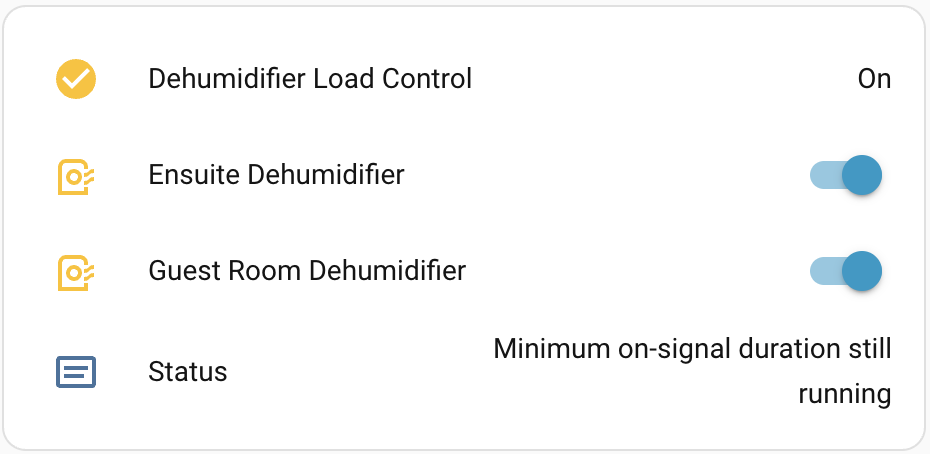
TL;DR
Use Fronius GEN24 Load Management Relay states to control Zigbee / Wifi switches in Home Assistent by MQTT.
This isn’t a full step-by-step guide but, if you’re here, you probably know enough to fill in the gaps for your setup.
Investigation
We own a Fronius Gen24 Plus inverter in our solar installation.
This inverter has four internal load management relays which allow users to switch loads on and off according to rules. These relays would be great in a new build but to retrofit into an existing house isn’t really practical for us.
I thought a great way to use them would be to find out if the status of the relays was available via the local Fronius API.
A lot of Googling turned up very little!
After some sniffing network traffic, I discovered this endpoint where fronius.minimaker.space is the internal DNS name of our inverter.:
https://fronius.minimaker.space/api/status/emrs
This returns:
{
"pin1": {
"reason": "PSTR_EMRS_REASON_3",
"state": true
},
"pin2": {
"reason": "PSTR_EMRS_REASON_0",
"state": false
},
"pin3": {
"reason": "PSTR_EMRS_REASON_0",
"state": false
},
"pin4": {
"reason": "PSTR_EMRS_REASON_0",
"state": false
}
}
The constants, PSTR_EMRS_REASON_*, were a bit of a mystery. Googling turned up absolutely nothing. So, after a bit of sniffing around, I found this:
https://fronius.minimaker.space/app/assets/i18n/WeblateTranslations/ui/en.json?id=1.36.6-1.json
Which, in turn, revealed this:
"STATE": {
"PSTR_EMRS_REASON_0": "Disabled or missing functions and I/Os configuration",
"PSTR_EMRS_REASON_1": "Source power is invalid",
"PSTR_EMRS_REASON_2": "Maximum duration per day exceeded",
"PSTR_EMRS_REASON_3": "Minimum on-signal duration still running",
"PSTR_EMRS_REASON_4": "Power below threshold",
"PSTR_EMRS_REASON_5": "Power above threshold",
"PSTR_EMRS_REASON_6": "Desired duration not reached"
}
I wanted to publish this information via MQTT to fronius/power_management/relay/Pin_Number, so that I could use it in Home Assistant to turn on and off our dehumidifiers when there was excess solar production.
The format I settled on is below.
{
  "state": "on",
  "reason": "PSTR_EMRS_REASON_3",
  "label": "Minimum on-signal duration still running"
}
Node-RED
I used Node-RED to query the API and publish the data to my MQTT Broker.
The flow:
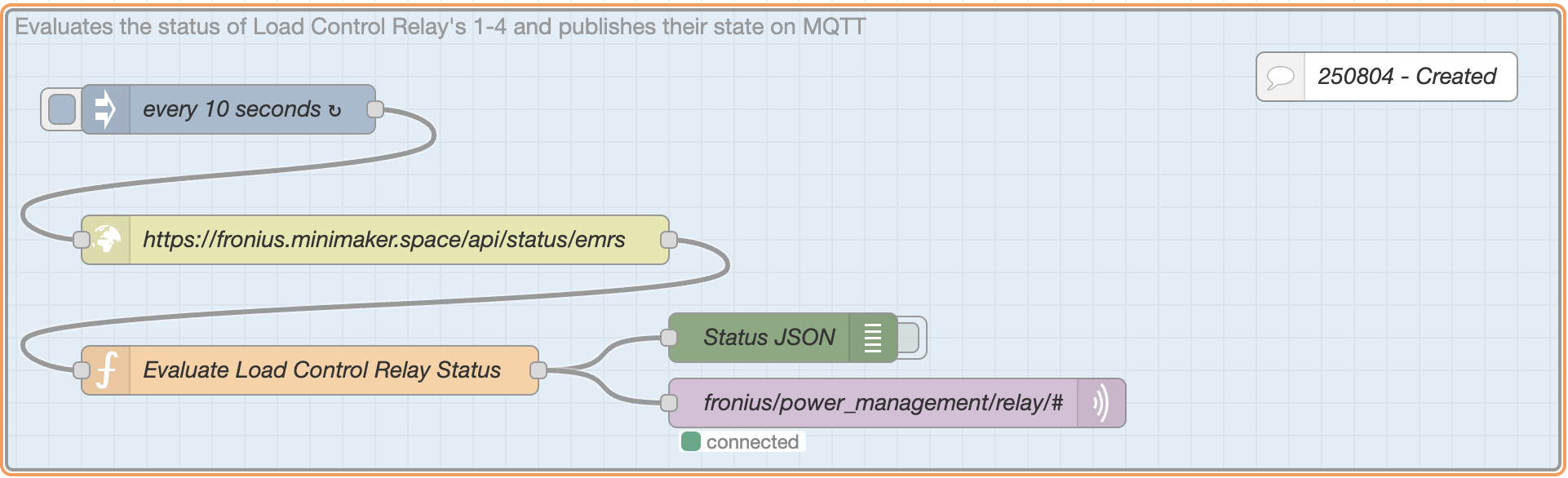
The function ‘Evaluate Load Control Relay Status’ which does the work:
/* Constants found in:
   https://fronius.minimaker.space/app/assets/i18n/WeblateTranslations/ui/en.json?id=1.36.6-1.json
*/
const reasonMap = {
    "PSTR_EMRS_REASON_0": "Disabled or missing functions and I/Os configuration",
    "PSTR_EMRS_REASON_1": "Source power is invalid",
    "PSTR_EMRS_REASON_2": "Maximum duration per day exceeded",
    "PSTR_EMRS_REASON_3": "Minimum on-signal duration still running",
    "PSTR_EMRS_REASON_4": "Power below threshold",
    "PSTR_EMRS_REASON_5": "Power above threshold",
    "PSTR_EMRS_REASON_6": "Desired duration not reached"
};

const messages = [];

for (const [pin, data] of Object.entries(msg.payload)) {
    const pinNumberMatch = pin.match(/^pin(\d)$/);
    if (pinNumberMatch) {
        const pinNumber = pinNumberMatch[1];
        const label = reasonMap[data.reason] || `Unmapped reason: ${data.reason}`;
        const stateStr = data.state === true ? "on" : "off";

        const payloadStr = JSON.stringify({
            state: stateStr,
            reason: data.reason,
            label: label
        });

        messages.push({
            topic: `fronius/power_management/relay/${pinNumber}`,
            payload: payloadStr
        });
    }
}

return [messages];
The complete Node-RED flow which includes the function:
[
    {
        "id": "6da219b64d682c8a",
        "type": "tab",
        "label": "Fronius Load Control",
        "disabled": false,
        "info": "",
        "env": []
    },
    {
        "id": "4d94e01a9851d8f0",
        "type": "group",
        "z": "6da219b64d682c8a",
        "name": "Evaluates the status of Load Control Relay's 1-4 and publishes their state on MQTT",
        "style": {
            "label": true,
            "color": "#999999",
            "fill": "#bfdbef",
            "fill-opacity": "0.5"
        },
        "nodes": [
            "3f5380f3c9401795",
            "a9f118a64947b585",
            "2f09191d511c4939",
            "794aab08a2604191",
            "b84678b43c2be072",
            "924bde31d30fa6c5"
        ],
        "x": 14,
        "y": 19,
        "w": 952,
        "h": 282
    },
    {
        "id": "3f5380f3c9401795",
        "type": "http request",
        "z": "6da219b64d682c8a",
        "g": "4d94e01a9851d8f0",
        "name": "https://fronius.minimaker.space/api/status/emrs",
        "method": "GET",
        "ret": "obj",
        "paytoqs": "ignore",
        "url": "https://fronius.minimaker.space/api/status/emrs",
        "tls": "",
        "persist": false,
        "proxy": "",
        "insecureHTTPParser": false,
        "authType": "",
        "senderr": false,
        "headers": [],
        "x": 240,
        "y": 160,
        "wires": [
            [
                "794aab08a2604191"
            ]
        ]
    },
    {
        "id": "a9f118a64947b585",
        "type": "inject",
        "z": "6da219b64d682c8a",
        "g": "4d94e01a9851d8f0",
        "name": "every 10 seconds",
        "props": [
            {
                "p": "payload"
            },
            {
                "p": "topic",
                "vt": "str"
            }
        ],
        "repeat": "10",
        "crontab": "",
        "once": true,
        "onceDelay": 0.1,
        "topic": "",
        "payload": "",
        "payloadType": "date",
        "x": 150,
        "y": 80,
        "wires": [
            [
                "3f5380f3c9401795"
            ]
        ]
    },
    {
        "id": "2f09191d511c4939",
        "type": "debug",
        "z": "6da219b64d682c8a",
        "g": "4d94e01a9851d8f0",
        "name": "Status JSON",
        "active": false,
        "tosidebar": true,
        "console": false,
        "tostatus": false,
        "complete": "payload",
        "targetType": "msg",
        "statusVal": "",
        "statusType": "auto",
        "x": 490,
        "y": 220,
        "wires": []
    },
    {
        "id": "794aab08a2604191",
        "type": "function",
        "z": "6da219b64d682c8a",
        "g": "4d94e01a9851d8f0",
        "name": "Evaluate Load Control Relay Status",
        "func": "/* Constants found in:\n   https://fronius.minimaker.space/app/assets/i18n/WeblateTranslations/ui/en.json?id=1.36.6-1.json\n*/\nconst reasonMap = {\n    \"PSTR_EMRS_REASON_0\": \"Disabled or missing functions and I/Os configuration\",\n    \"PSTR_EMRS_REASON_1\": \"Source power is invalid\",\n    \"PSTR_EMRS_REASON_2\": \"Maximum duration per day exceeded\",\n    \"PSTR_EMRS_REASON_3\": \"Minimum on-signal duration still running\",\n    \"PSTR_EMRS_REASON_4\": \"Power below threshold\",\n    \"PSTR_EMRS_REASON_5\": \"Power above threshold\",\n    \"PSTR_EMRS_REASON_6\": \"Desired duration not reached\"\n};\n\nconst messages = [];\n\nfor (const [pin, data] of Object.entries(msg.payload)) {\n    const pinNumberMatch = pin.match(/^pin(\\d)$/);\n    if (pinNumberMatch) {\n        const pinNumber = pinNumberMatch[1];\n        const label = reasonMap[data.reason] || `Unmapped reason: ${data.reason}`;\n        const stateStr = data.state === true ? \"on\" : \"off\";\n\n        const payloadStr = JSON.stringify({\n            state: stateStr,\n            reason: data.reason,\n            label: label\n        });\n\n        messages.push({\n            topic: `fronius/power_management/relay/${pinNumber}`,\n            payload: payloadStr\n        });\n    }\n}\n\nreturn [messages];",
        "outputs": 1,
        "timeout": 0,
        "noerr": 0,
        "initialize": "",
        "finalize": "",
        "libs": [],
        "x": 200,
        "y": 240,
        "wires": [
            [
                "2f09191d511c4939",
                "b84678b43c2be072"
            ]
        ]
    },
    {
        "id": "b84678b43c2be072",
        "type": "mqtt out",
        "z": "6da219b64d682c8a",
        "g": "4d94e01a9851d8f0",
        "name": "fronius/power_management/relay/#",
        "topic": "",
        "qos": "",
        "retain": "",
        "respTopic": "",
        "contentType": "",
        "userProps": "",
        "correl": "",
        "expiry": "",
        "broker": "7871d5ea.5bb69c",
        "x": 560,
        "y": 260,
        "wires": []
    },
    {
        "id": "924bde31d30fa6c5",
        "type": "comment",
        "z": "6da219b64d682c8a",
        "g": "4d94e01a9851d8f0",
        "name": "250804 - Created",
        "info": "",
        "x": 860,
        "y": 60,
        "wires": []
    },
    {
        "id": "7871d5ea.5bb69c",
        "type": "mqtt-broker",
        "name": "ip.mqtt.minimaker.space",
        "broker": "ip.mqtt.minimaker.space",
        "port": "1883",
        "clientid": "",
        "autoConnect": true,
        "usetls": false,
        "protocolVersion": "4",
        "keepalive": "60",
        "cleansession": true,
        "autoUnsubscribe": true,
        "birthTopic": "",
        "birthQos": "0",
        "birthRetain": "true",
        "birthPayload": "",
        "birthMsg": {},
        "closeTopic": "",
        "closeQos": "0",
        "closePayload": "",
        "closeMsg": {},
        "willTopic": "",
        "willQos": "0",
        "willPayload": "",
        "willMsg": {},
        "userProps": "",
        "sessionExpiry": ""
    }
]
Home Assistant
In Home Assistant, I added this to my configuration.yaml file. Unique ID’s were created with the Online UUID Generator
mqtt:
  sensor:-
    unique_id: "fd19ba49-1631-492c-882b-5a9afbeac224"
          state_topic: "fronius/power_management/relay/1"
          name: "Fronius Load Control Relay 1 Label"
          value_template: '{{ value_json.label }}'

        - unique_id: "1a99f969-3f3e-4e19-8468-43aedefa5348"
          state_topic: "fronius/power_management/relay/2"
          name: "Fronius Load Control Relay 2 Label"
          value_template: '{{ value_json.label }}'

        - unique_id: "66dcb0ae-592d-4fb5-a517-7b8d15390a69"
          state_topic: "fronius/power_management/relay/3"
          name: "Fronius Load Control Relay 3 Label"
          value_template: '{{ value_json.label }}'

        - unique_id: "06f3f237-cd66-4962-aad7-d1b1b24c13af"
          state_topic: "fronius/power_management/relay/4"
          name: "Fronius Load Control Relay 4 Label"
          value_template: '{{ value_json.label }}'

    binary_sensor:
        - unique_id: "7c6a1e6e-0e33-22ff-be56-0242ac110002"
          state_topic: "fronius/power_management/relay/1"
          name: "Fronius Load Control Relay 1 State"
          payload_on: "on"
          payload_off: "off"
          value_template: "{{ value_json.state }}"

        - unique_id: "fef21894-8cb0-4ae3-96d8-babd11aecc2f"
          state_topic: "fronius/power_management/relay/2"
          name: "Fronius Load Control Relay 2 State"
          payload_on: "on"
          payload_off: "off"
          value_template: "{{ value_json.state }}"

        - unique_id: "b451aba9-8d5a-4314-8a5a-8b4505ce33bf"
          state_topic: "fronius/power_management/relay/3"
          name: "Fronius Load Control Relay 3 State"
          payload_on: "on"
          payload_off: "off"
          value_template: "{{ value_json.state }}"

        - unique_id: "4c135e2a-d6b5-4c34-884a-7959f35a9dbd"
          state_topic: "fronius/power_management/relay/4"
          name: "Fronius Load Control Relay 4 State"
          payload_on: "on"
          payload_off: "off"
          value_template: "{{ value_json.state }}"
After restarting Home Assistant, I was able to add a card: